Transport Management
Manage school vehicles, design custom routes, and assign students reliably.
1. Manage Vehicles & Routes
Establish the foundation of the transport network.
- Vehicles: Add buses/vans mapping their License Plate, Capacity, and Driver information.
- Routes & Fares: Under Manage Routes, define the path Name (e.g., "North City Bus 1") and the base Fare structure.
- Binding: In the Routes listing, click the Assign Vehicle icon to strictly bind a specific physical bus to the newly created conceptual Route.
Hard Deletion Block: The
`TransportRouteController` prevents deletion of any Route if there are active students currently assigned to
it. You must unassign all passengers first manually.
2. Student Assignment Logistics
Allocating seats on the bus.
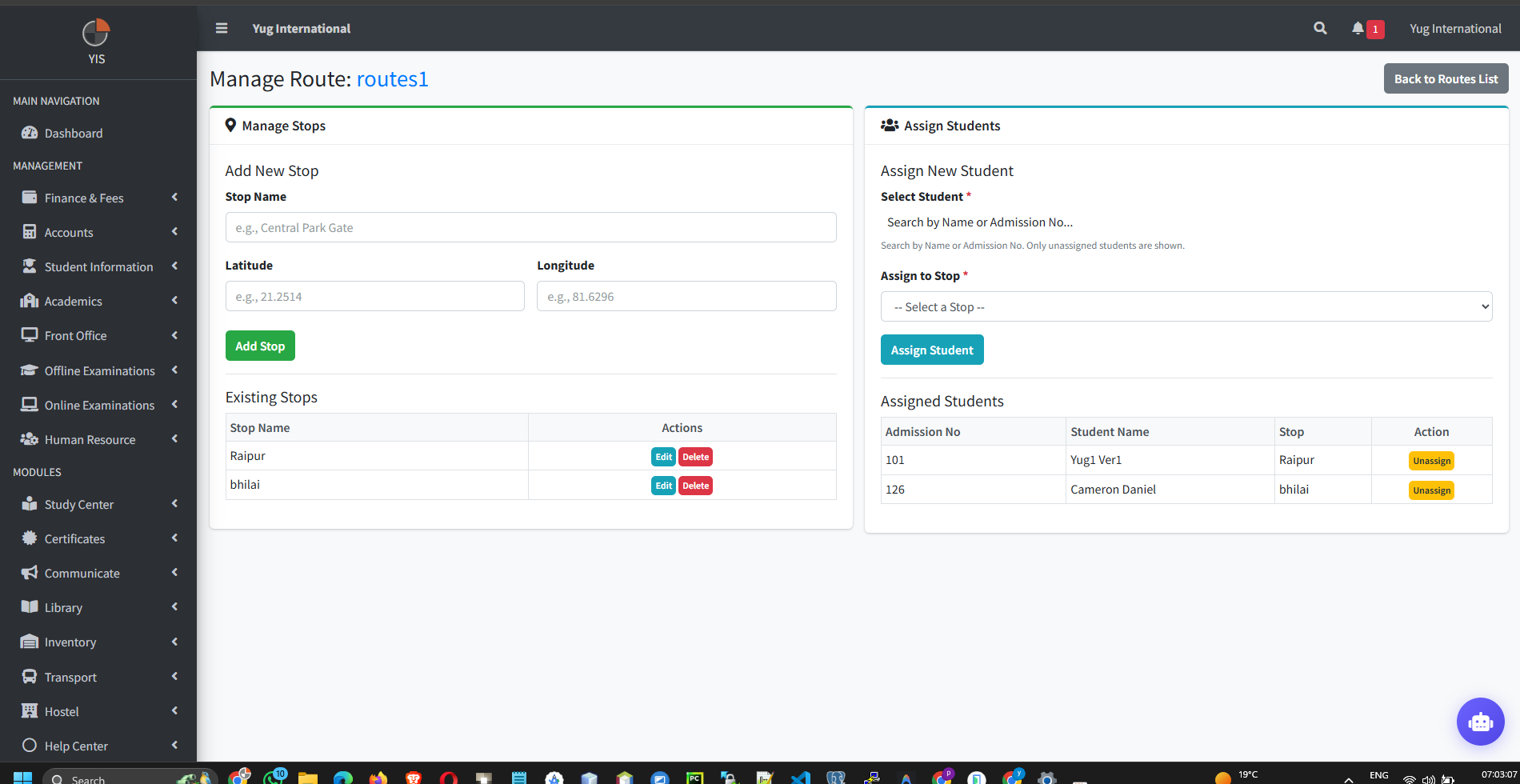
- Go to a specific Route's detail page.
- Use the Search bar to find an `active` Student.
- Database Exclusivity: The `StudentTransportController` enforces a strict Unique Rule: A student can only ever be assigned to one exact combination of Route + Stop at any given time. If a student is already on 'Bus 1', the system will block assigning them to 'Bus 2'.
- Fee Automation: Currently, assigning a student merely logs their seat. Financial fee structures must still be generated independently via the Finance module.