Master Menu Builder
Visually construct the exact sidebar navigation hierarchy that different user roles will see when they log securely into the platform.
Critical Access Override: The Master Menu
determines the physical navigation links. However, if a school's Subscription Plan does not include
a specific module, that menu link will be hidden from their users regardless of how you configure it here.
1. Selecting the Target Role
Before making changes, you must select which user's perspective you are modifying.
- Open the Role Selector dropdown at the top of the interface.
- Choose a platform role (e.g., General Manger, Teacher, Accountant, Parent).
- The interface will load the current saved menu structure for that specific role.
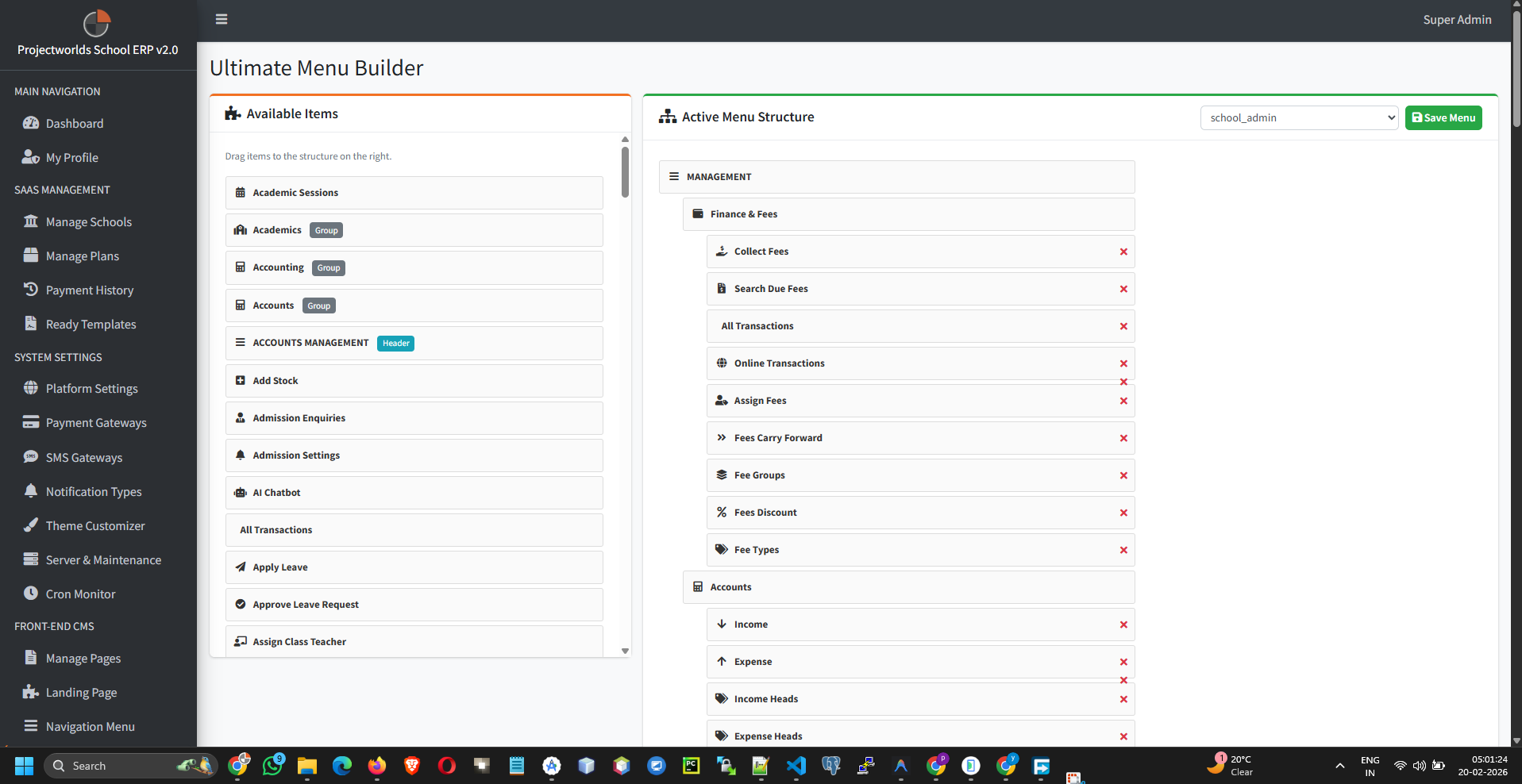
2. Visual Drag & Drop Builder
The interface is split into two columns: Available Items and the Active Sidebar.
- Adding Links: Check the boxes next to modules in the left column (e.g., Live Classes, Transport, HR) and click Add to Menu.
- Reordering: Click and hold an item in the right column, dragging it up or down to change its display order in the live sidebar.
- Creating Submenus: Drag an item underneath and slightly to the right of another item. It will nest under it, creating a dropdown folder (e.g., putting "Manage Books" inside "Library").
- Removing Links: Click the red icon on any active item to remove it from that role's view.
- Click Save Menu Structure to finalize.
3. The "Copy Structure" Utility
If you create a new custom role (e.g., "Vice Principal"), you don't need to build their menu from scratch.
- Select your new empty role in the main dropdown.
- Locate the Copy From Role block.
- Select an existing role that has a similar structure (e.g., "School Admin").
- Click Copy Structure. The system instantly clones the entire hierarchy to your target role.
Pro Tip: Copy the "School Admin" menu to new administrative
roles, save it, and then simply delete the 1 or 2 high-level items (like Settings or Payroll) they shouldn't
access to save massive amounts of time.